
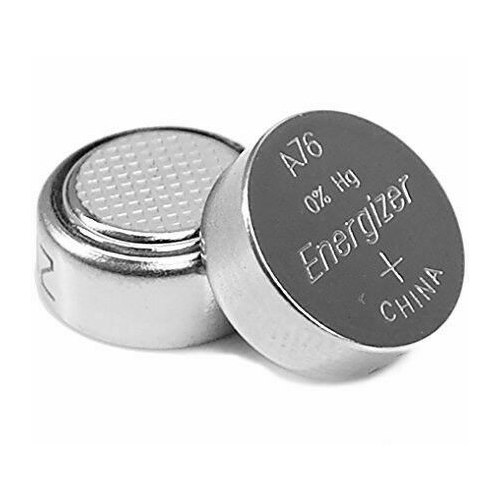
Looking for a button battery size chart? You’re in the right place. This guide provides the definitive cross-reference for all common coin cell batteries.
Finding the correct replacement is crucial for your devices to function properly and safely. A wrong size can cause damage or even become a hazard.
Best Button Battery Brands for Reliable Power – Detailed Comparison
Energizer CR2032 – Best Overall Choice
The Energizer CR2032 is the gold standard for 3V lithium coin cells. It offers long-lasting power and consistent voltage for key fobs, watches, and medical devices. Its reliable performance and wide availability make it the top recommended choice for general use.

- 3V LITHIUM COIN 2032 BATTERY PACK: One 10 pack of Energizer lithium…
- POWERS A VARIETY OF DEVICES: Ideal for use as a AirTag battery and medical…
Duracell 2032 DL2032 – Premium Long-Life Option
For maximum shelf life and durability, choose the Duracell 2032. It features a 10-year storage life and is ideal for critical applications like car key remotes and security system sensors. This battery is built for devices where infrequent but dependable power is essential.

- 12 Duracell DL2032 Duralock Lithium Batteries Cell Button Electronics (2×6)
Panasonic BR2032 – Best for Extreme Temperatures
The Panasonic BR2032 uses advanced carbon lithium chemistry. It excels in extreme temperature ranges and high-drain devices like automotive TPMS sensors. This is the best option for specialized electronics that demand stable performance in challenging environments.

- Designed to perfection
- Compact construction
Button Battery Sizes and Codes
Navigating button battery sizes can be confusing. Manufacturers use a standardized alphanumeric code system. This code reveals the battery’s chemistry, shape, and dimensions at a glance.
How to Decode Common Battery Numbering Systems
The code on a battery, like CR2032, is not random. Each segment provides specific technical information. Understanding this is key to finding the correct replacement.
- First Letter (Chemistry): “C” means Lithium, “L” means Alkaline, “S” means Silver Oxide. This affects voltage and performance.
- Second Letter (Shape): “R” stands for Round. This indicates the battery is a cylindrical coin cell.
- First Two Numbers (Diameter): In CR2032, “20” means 20.0 mm. This is the battery’s width.
- Last Two Numbers (Height): In CR2032, “32” means 3.2 mm. This is the battery’s thickness.
International Standard Size Codes
Beyond common codes, you may see IEC or ANSI standards. These are used internationally and provide another way to identify the same cell.
| Common Code | IEC Code | ANSI Code | Typical Use |
|---|---|---|---|
| CR2032 | CR2032 | 5003LC | Motherboards, Key Fobs |
| LR44 | LR44 | A76 | Calculators, Toys |
| SR626SW | SR626SW | 377 | Watches, Medical Devices |
Key Takeaway: Always match the code exactly. A CR2032 is not the same as a CR2025, even though the diameter is identical. The height difference will prevent proper contact in the device.
How to Use a Button Battery Size Chart Correctly
A size chart is your essential tool for finding the right battery. Using it properly ensures device compatibility and safety. Follow these steps for accurate identification and selection.
Step-by-Step Guide to Finding Your Battery Size
If the old battery’s code is worn off, you can still identify it. This process requires careful measurement and cross-referencing.
- Measure the Diameter: Use calipers or a ruler to measure the battery’s width in millimeters. Be as precise as possible.
- Measure the Height/Thickness: Measure the battery’s thickness, also in millimeters. Note if it has a raised button top.
- Check the Voltage: If the old battery still has a charge, use a multimeter to check its voltage (common: 1.5V, 3V, 3.6V).
- Cross-Reference on the Chart: Match your measurements and voltage to the corresponding code in the size chart table.
Critical Safety Considerations When Replacing Batteries
Button batteries pose serious risks if handled incorrectly. Safety should always be your top priority during replacement.
- Swallowing Hazard: Keep all batteries away from children and pets. If swallowed, seek emergency medical help immediately.
- Correct Polarity: Always insert the battery with the correct side facing up (+/-). The device compartment will have a diagram.
- No Mixing: Never mix old and new batteries, or batteries of different chemistries (e.g., alkaline and lithium).
- Proper Disposal: Do not throw used batteries in household trash. Recycle them at designated collection points.
Pro Tip: Before you remove the old battery, take a clear photo of it in the compartment. This provides a visual reference for polarity and positioning, preventing installation errors.
Comprehensive Button Battery Size Chart and Equivalents
This chart is your master reference for the most common coin cell batteries. It cross-references sizes, codes, and typical applications. Use it to find direct replacements and suitable equivalents for your device.
Commonly Used Models
| Model | Voltage | Common Applications |
|---|---|---|
| CR2032 | 3V | Keyless entry remotes, watches |
| LR44 | 1.5V | Children’s toys, calculators |
| SR626SW | 1.55V | Luxury watches, thermometers |
Alkaline Button Cells (Prefix: LR)
Inexpensive, widely used, but shorter lifespan.
| Battery Code | Diameter | Height | Voltage | Common Uses |
|---|---|---|---|---|
| LR41 | 7.9 mm | 3.6 mm | 1.5V | Thermometers, small electronics |
| LR43 | 11.6 mm | 4.2 mm | 1.5V | Calculators, watches |
| LR44 | 11.6 mm | 5.4 mm | 1.5V | Toys, watches, laser pointers |
| LR521 | 5.8 mm | 2.1 mm | 1.5V | Watches, small devices |
| LR626 | 6.8 mm | 2.6 mm | 1.5V | Watches, LED lights |
| LR1130 | 11.6 mm | 3.0 mm | 1.5V | Calculators, toys |
Silver Oxide Button Cells (Prefix: SR)
Stable, longer-lasting; used in precision instruments.
| Battery Code | Diameter | Height | Voltage | Common Uses |
|---|---|---|---|---|
| SR41 (312) | 7.9 mm | 3.6 mm | 1.55V | Watches, medical devices |
| SR626SW | 6.8 mm | 2.6 mm | 1.55V | Watches |
| SR44 | 11.6 mm | 5.4 mm | 1.55V | Cameras, watches, toys |
| SR521SW | 5.8 mm | 2.1 mm | 1.55V | Watches |
| SR920SW | 9.5 mm | 2.1 mm | 1.55V | Watches |
Lithium Coin Cells (Prefix: CR)
Long shelf life, higher voltage; common in remotes, car keys, and memory backup.
| Battery Code | Diameter | Height | Voltage | Common Uses |
|---|---|---|---|---|
| CR1025 | 10.0 mm | 2.5 mm | 3V | Watches, fitness trackers |
| CR1216 | 12.0 mm | 1.6 mm | 3V | Key fobs |
| CR1220 | 12.0 mm | 2.0 mm | 3V | Remotes, medical devices |
| CR1616 | 16.0 mm | 1.6 mm | 3V | Car keys, fitness devices |
| CR1620 | 16.0 mm | 2.0 mm | 3V | Key fobs, glucometers |
| CR1632 | 16.0 mm | 3.2 mm | 3V | Car key remotes, LEDs |
| CR2016 | 20.0 mm | 1.6 mm | 3V | Calculators, car remotes |
| CR2025 | 20.0 mm | 2.5 mm | 3V | Watches, remotes, medical devices |
| CR2032 | 20.0 mm | 3.2 mm | 3V | Motherboards, remotes, scales |
| CR2450 | 24.5 mm | 5.0 mm | 3V | Medical devices, sensors |
Zinc Air Cells (Prefix: PR)
Primarily used in hearing aids.
| Battery Code | Diameter | Height | Voltage | Common Uses |
|---|---|---|---|---|
| PR41 (312) | 7.9 mm | 3.6 mm | 1.45V | Hearing aids |
| PR44 (675) | 11.6 mm | 5.4 mm | 1.45V | Hearing aids |
| PR48 (13) | 7.9 mm | 5.4 mm | 1.45V | Hearing aids |
| PR70 (10) | 5.8 mm | 3.6 mm | 1.45V | Hearing aids |
Choosing the Right Battery: Chemistry and Application Guide
Selecting a battery goes beyond just size. The chemical composition determines its voltage, lifespan, and suitability. Matching the chemistry to your device’s needs is crucial for performance and safety.
Lithium vs. Alkaline vs. Silver Oxide: Key Differences
Each battery chemistry has distinct advantages and ideal use cases. Understanding these differences prevents device damage and ensures reliability.
| Chemistry (Code) | Voltage | Key Characteristics | Best For |
|---|---|---|---|
| Lithium (CR/BR) | 3V | Long shelf life (10+ years), stable output, works in extreme temps | Memory backup, key fobs, high-drain electronics |
| Alkaline (LR) | 1.5V | Widely available, lower cost, shorter shelf life | Toys, calculators, low-drain devices |
| Silver Oxide (SR) | 1.55V | Very stable voltage, high capacity for size, longer life | Watches, medical devices, precision instruments |
Matching Battery to Device Type
Using the wrong battery chemistry can lead to poor performance or failure. Follow these application-specific guidelines.
- Computers & Electronics (CMOS): Always use lithium (CR) batteries. They provide the stable, long-term power needed for memory preservation.
- Watches & Medical Devices: Use silver oxide (SR) as specified. Their steady voltage ensures accurate timekeeping and device function.
- Toys & Calculators: Alkaline (LR) cells are typically sufficient and cost-effective for these intermittent-use items.
- Automotive (TPMS, Keys): Choose lithium, often the temperature-resistant BR type, for durability in harsh environments.
Expert Recommendation: When in doubt, check the device manual or the old battery compartment. Manufacturers often print the required battery code (e.g., “CR2032”) directly inside the battery holder. Never substitute a lower-voltage battery for a higher-voltage requirement.
Where to Buy Button Batteries and Storage Tips
Knowing where to find quality batteries and how to store them extends their life and ensures safety. Reliable sourcing prevents the purchase of counterfeit or degraded cells that can damage your devices.
Best Places to Purchase Quality Button Cells
Button batteries are widely available, but source quality varies. Choose reputable retailers to guarantee freshness and authenticity.
- Electronics Stores: Retailers like Best Buy or Micro Center offer name-brand options with knowledgeable staff.
- Pharmacies & Big-Box Stores: Walmart, CVS, and Walgreens stock common sizes (CR2032, LR44) for convenience.
- Online Marketplaces: Amazon and dedicated battery websites provide the widest selection and bulk pricing. Always check seller ratings and reviews.
- Watch Repair/Jewelry Shops: The best source for specific silver oxide watch batteries (SR series).
Proper Storage and Handling for Longevity
Improper storage drains battery life and creates hazards. Follow these guidelines to maintain battery performance from purchase to use.
- Keep in Original Packaging: Store batteries in their blister pack until needed. This prevents contact with other metals that could cause a short circuit.
- Control Temperature & Humidity: Store in a cool, dry place at room temperature. Avoid garages or cars where extreme heat or cold can accelerate discharge.
- Check Expiry Dates: Lithium batteries have a long shelf life (often 10 years), but always note the manufacture or expiry date on the package.
- Use Plastic Organizers: For loose batteries, use a dedicated plastic case with separate compartments. Never let batteries roll loose in a drawer.
Critical Warning: Never store batteries in a metal container or with other metal objects like keys or coins. Contact with metal can complete a circuit, causing the battery to overheat, leak, or even explode.
Troubleshooting Common Button Battery Issues
Even with the correct battery, problems can occur. This troubleshooting guide helps you diagnose and solve the most frequent issues. Quick identification can save you time and prevent unnecessary replacements.
Diagnosing and Fixing Battery Compartment Problems
Often, the issue isn’t the battery itself but the device’s contacts or compartment. A simple inspection can reveal the cause.
- Corroded Contacts: Look for green or white crusty deposits on the metal springs or plates. Gently clean them with a cotton swab dipped in vinegar or isopropyl alcohol.
- Weak Spring Tension: If the battery compartment spring is flattened, it may not hold the battery snugly. Carefully bend the spring upward to restore pressure.
- Wrong Polarity Installation: Double-check the + and – symbols. The flat side of the battery is usually negative (-), while the side with writing/button is positive (+).
What to Do When a New Battery Doesn’t Work
If a fresh, correct battery fails to power your device, follow this logical sequence. This process helps isolate the problem between the battery and the device.
- Verify Battery Voltage: Use a multimeter to test the new battery. A 3V lithium cell should read at least 2.8V to be functional.
- Check for Plastic Insulator Tabs: Some new batteries have a protective plastic film on one side. Ensure you have removed it completely before installation.
- Test in Another Device: If possible, place the suspect battery in a known-working device of the same type. This confirms if the battery is truly dead.
- Inspect for Device Damage: Look for water damage, broken wires, or burnt components inside the device. The problem may be electronic, not the power source.
Quick Fix: If a device with a new battery works intermittently when you press on the battery cover, the issue is likely poor contact. Try placing a small piece of aluminum foil or a conductive spacer in the compartment to improve the connection.
Button Battery Safety and Childproofing Your Home
Button batteries pose a severe and immediate health risk if swallowed. Their small size and shiny appearance are attractive to young children. Implementing strict safety measures is non-negotiable for any household.
The Severe Dangers of Swallowing Button Batteries
When ingested, a button battery can cause catastrophic internal damage in just two hours. It is a true medical emergency requiring immediate action.
- Chemical Burn Risk: The battery reacts with bodily fluids, creating a caustic soda that burns through the esophagus or other tissues.
- No Obvious Symptoms: A child may not choke or show immediate distress, delaying critical diagnosis. Symptoms can mimic a common cold.
- Lodging Hazard: The battery can get stuck in the throat or digestive tract, causing internal electrical current and rapid tissue necrosis.
Essential Childproofing Steps for Battery Safety
Proactive prevention is the only effective strategy. Secure all devices and batteries before a child can access them.
- Secure Battery Compartments: Use strong tape or child-resistant locks on any device with a battery compartment that doesn’t require a tool to open.
- Store Spares Inaccessible: Keep all spare and used batteries in a locked cabinet or container, high up and out of sight and reach.
- Examine Devices Regularly: Check that battery compartments on toys, remotes, and other household items are securely closed and undamaged.
- Dispose of Used Batteries Immediately: Do not leave old batteries on counters or in open trash cans. Tape both sides and recycle them promptly.
EMERGENCY ACTION: If you suspect a child has swallowed a button battery, do not wait for symptoms. Do not induce vomiting. Go to the nearest emergency room immediately. Inform staff it is a suspected button battery ingestion.
Conclusion: Mastering Your Button Battery Size Chart
This complete guide empowers you to confidently identify and replace any coin cell battery. You now understand the code system, safety protocols, and chemistry differences.
Remember, the exact size and chemistry matter for device safety and performance. Always cross-reference codes and measure carefully when unsure.
Bookmark this page as your go-to reference for future battery needs. Share it with friends or family to spread crucial safety knowledge.
You are now equipped to handle any button battery replacement with expertise and confidence.
Frequently Asked Questions about Button Batteries
What is the difference between CR2032 and CR2025 batteries?
Both are 3V lithium batteries with a 20mm diameter. The key difference is their thickness. The CR2032 is 3.2mm thick, while the CR2025 is only 2.5mm thick.
They are not always interchangeable. Using a thinner CR2025 in a device designed for a CR2032 may cause poor contact and malfunction. Always use the exact size specified.
How can I tell if a button battery is still good?
The most reliable method is to test its voltage with a multimeter. A fresh 3V lithium battery should read at least 2.8-3.0V. A 1.5V alkaline or silver oxide cell should read above 1.3V.
Visual inspection is not enough. A battery can look perfect but be completely discharged. For critical devices, always start with a new, high-quality battery.
Are LR44 and AG13 batteries the same thing?
Yes, LR44 and AG13 are physically identical and typically interchangeable. LR44 is the common alkaline chemistry designation, while AG13 is one of its many industry code equivalents.
Other common equivalents include A76, 157, and G13. They all share the same 11.6mm diameter and 5.4mm height, providing 1.5V of power.
What is the best way to store spare button batteries?
Keep them in their original blister packaging until needed. Store the packages in a cool, dry place at room temperature, away from metal objects.
For loose batteries, use a dedicated plastic organizer. Never store batteries in a metal container or let them contact other metals, as this can cause a dangerous short circuit.
Why do my car key fob batteries die so quickly?
Rapid drainage is often caused by a stuck button or signal interference. If a button on the fob is partially pressed in your pocket or bag, it continuously transmits, draining the battery.
It can also be due to using a low-quality battery or one with the wrong chemistry. Always use a name-brand lithium battery (like CR2032) specified for automotive remotes.
Can I use an alkaline battery instead of a silver oxide battery?
You can often fit an alkaline (LR) cell where a silver oxide (SR) cell was used, as they are the same size. However, this is not recommended for precision devices.
Silver oxide provides a more stable voltage over its entire life, crucial for watches and medical equipment. Alkaline voltage drops gradually, which can affect accuracy.
What should I do with dead button batteries?
Do not throw them in regular household trash. Tape both sides of the used battery with clear tape to prevent any residual charge from causing a fire or short.
Then, take them to a designated battery recycling drop-off point. Many electronics stores, hardware stores, and community centers offer free battery recycling bins.
How do I safely clean battery corrosion from a device?
First, remove the old battery with gloves. Use a cotton swab dipped in white vinegar or lemon juice to neutralize and dissolve the alkaline corrosion on the contacts.
After cleaning, use a swab with isopropyl alcohol to remove any vinegar residue. Let the compartment dry completely before inserting a new battery.