
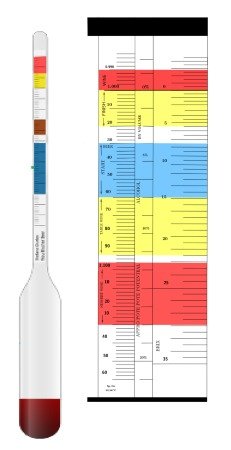
What do your battery hydrometer readings mean? A battery hydrometer readings chart is your essential tool for decoding a lead-acid battery’s state of charge and health. It translates specific gravity measurements into actionable insights.
This simple test prevents unexpected failure by revealing problems like undercharging or sulfation. Our expert guide and easy-to-follow chart will make you a testing pro.
Best Hydrometers for Battery Testing – Detailed Comparison
Klein Tools BAT-500 – Best Overall Digital Hydrometer
The Klein Tools BAT-500 is our top pick for its digital accuracy and ease of use. It provides a direct temperature-corrected specific gravity reading on an LCD screen, eliminating manual chart interpretation. This model is ideal for professional technicians and serious DIYers who value precision and speed in their battery maintenance routine.
OTC 4619 Professional Battery Hydrometer – Best Traditional Tool
For a reliable, time-tested tool, the OTC 4619 Professional Battery Hydrometer is the recommended choice. It features a built-in thermometer and a durable, color-coded float for clear readings. Its robust construction makes it the best option for automotive shops, fleet maintenance, and users who prefer the classic, proven method of manual testing.
ABN Battery Hydrometer and Antifreeze Tester Set – Best Value Kit
The ABN 5-Piece Tester Set offers exceptional value. This kit includes a hydrometer, antifreeze tester, and three funnels for a complete cooling system and battery check. It’s the ideal for home mechanics and car owners needing a versatile, budget-friendly tool to monitor both battery electrolyte and coolant protection levels effectively.
How to Read and Interpret a Battery Hydrometer Chart
Understanding a battery hydrometer readings chart is crucial for accurate diagnostics. This chart correlates the specific gravity of the electrolyte to the battery’s state of charge. It also accounts for temperature, which significantly affects readings.
Standard Chart (Temperate Climates)
| State of Charge (%) | Specific Gravity (SG) | Voltage (12V Battery) | Notes |
|---|---|---|---|
| 100% | 1.265 – 1.280 | ~12.6 V | Fully charged, optimal performance |
| 75% | 1.225 – 1.240 | ~12.1 V | Good charge, stable output |
| 50% | 1.190 – 1.210 | ~11.6 V | Moderate charge, usable |
| 25% | 1.155 – 1.180 | ~11.1 V | Low charge, reduced efficiency |
| 0% | 1.120 or lower | ~10.6 V | Discharged, recharge immediately |
Tropical Climate Adjustments
| State of Charge (%) | Specific Gravity (SG) |
|---|---|
| 100% | 1.210 – 1.230 |
| 75% | 1.190 – 1.210 |
| 50% | 1.160 – 1.180 |
| 25% | 1.130 – 1.150 |
| 0% | Below 1.130 |
How to Use a Battery Hydrometer
- Step 1: Draw electrolyte into the hydrometer from each cell.
- Step 2: Read the specific gravity value.
- Step 3: Compare readings across all cells. A variation of more than 0.030 between cells may indicate a fault.
- Step 4: Use the chart above to determine the battery’s state of charge.
Important Considerations
- Temperature Correction: For every 10°C above or below 25°C, adjust SG by ±0.004.
- Battery Type: Hydrometer readings apply only to flooded lead-acid batteries. AGM, Gel, and Lithium batteries do not use hydrometers.
- Maintenance Tip: Keep electrolyte levels topped up with distilled water and avoid deep discharges to extend battery life.
Specific Gravity and State of Charge
Specific gravity measures the density of the battery acid compared to water. A higher reading means more concentrated acid and a fuller charge. The standard chart is based on a temperature of 80°F (26.7°C).
- Full Charge (100%): 1.265 – 1.275 specific gravity
- Half Charge (50%): Approximately 1.190 – 1.200 specific gravity
- Discharged (0%): 1.120 or below specific gravity
Consistent readings across all cells are vital. A variation of more than 0.025 points between cells indicates a potential problem.
Correcting for Temperature: The Critical Step
Electrolyte temperature changes its density. You must adjust your reading using a temperature correction chart. A cold battery will show a falsely low reading, while a hot battery reads high.
For every 10°F above 80°F, add 0.004 to your hydrometer reading. For every 10°F below 80°F, subtract 0.004. Many quality hydrometers have a built-in thermometer and correction scale.
Key Takeaway: Always temperature-correct your specific gravity reading. A reading of 1.250 at 50°F actually indicates a much lower state of charge than the same reading at 80°F.
Diagnosing Battery Health from Your Readings
Your chart analysis reveals more than just charge level. It can diagnose common battery failures before they leave you stranded.
- Low Overall Readings: Indicates a battery needs charging or has lost capacity due to age (sulfation).
- Uneven Cell Readings: Suggests an internal short, plate damage, or stratified electrolyte.
- No Change After Charging: If readings remain low after a full charge, the battery may be permanently sulfated and require replacement.
Step-by-Step Guide to Testing with a Battery Hydrometer
Accurate testing requires a proper procedure. Following these steps ensures your readings are reliable and safe. Always wear protective gear like gloves and safety glasses when handling battery acid.
Safety First and Preparation
Begin by parking the vehicle on a level surface in a well-ventilated area. Turn off all electrical loads and the ignition. Carefully remove the battery cell caps, if applicable.
- Essential Safety Gear: Acid-resistant gloves and safety glasses are non-negotiable.
- Clean the Area: Wipe away any dirt or corrosion from the top of the battery before opening cells.
- Check Electrolyte Level: Ensure fluid covers the plates. If low, add distilled water only before testing.
The Correct Testing Procedure
Use this numbered process for consistent, accurate hydrometer readings every time.
- Insert and Fill: Place the hydrometer’s tube into the first cell. Squeeze and release the bulb to draw electrolyte in until the float rises freely.
- Read at Eye Level: Hold the hydrometer vertically. Read the specific gravity where the electrolyte level meets the float’s scale.
- Note Temperature: Use the tool’s built-in thermometer or a separate one to record the electrolyte temperature.
- Return and Repeat: Gently return the electrolyte to the same cell. Repeat this process for every cell in the battery.
Pro Tip: Draw enough electrolyte so the float doesn’t touch the top or bottom of the cylinder. This prevents friction from skewing your reading.
Recording and Analyzing Your Data
Document your findings for each cell. Create a simple table to track cell number, specific gravity, temperature, and the corrected reading.
This allows you to spot inconsistencies at a glance. Compare your corrected readings to the standard battery hydrometer chart. Analyze both the overall charge state and the balance between cells to assess health.
Common Hydrometer Reading Problems and Solutions
Even with a good chart, you may encounter confusing readings. Understanding these common issues helps you diagnose correctly and take the right action. Often, the problem lies with the testing method or a specific battery condition.
Low Readings in All Cells
If your corrected specific gravity is low across every cell, the battery is undercharged. This is the most common issue. The solution is to perform a slow, complete recharge with an appropriate battery charger.
- After Charging: Retest. If readings rise to normal (~1.265), the problem was simply a discharged state.
- If Still Low: The battery may be sulfated from chronic undercharging or old age. It has lost permanent capacity.
- Check the Charging System: A faulty alternator or voltage regulator may be the root cause.
Uneven Readings Between Cells
A variation greater than 0.025 points between cells signals internal trouble. This imbalance prevents the battery from delivering full power.
| Variation Pattern | Likely Cause | Action |
|---|---|---|
| One cell significantly lower | Internal short or plate damage | Battery replacement is usually required. |
| Gradual difference across cells | Electrolyte stratification (acid layers) | Try a controlled equalization charge. |
An equalization charge applies a slightly higher voltage to mix the electrolyte. Consult your battery’s manual for specific procedures.
Consistently High Specific Gravity
Readings that are always high, even after discharge, are less common but problematic. This often indicates water loss from overcharging or excessive heat.
Warning: Chronic overcharging warps plates and destroys batteries. Check your vehicle’s charging voltage (should be 13.8-14.7V for a 12V system) and ensure the battery is the correct type for the application.
If overcharging is ruled out, the battery may have been filled with concentrated acid instead of distilled water. In this case, the electrolyte must be carefully replaced by a professional.
Maintaining Battery Health with Regular Hydrometer Checks
Using a battery hydrometer chart is not just for troubleshooting. It’s a powerful preventive maintenance tool. Regular testing creates a health log and catches issues early, extending battery life significantly.
Creating a Preventive Testing Schedule
How often should you test? It depends on the battery’s use and criticality. A consistent schedule is more important than frequency.
- Seasonal Check (Cars/Boats): Test before summer and winter, the seasons of highest stress.
- Monthly Check (Off-Grid/Solar): For deep-cycle batteries in renewable energy systems, monthly tests are wise.
- Post-Charge Verification: Always test after a full charge to confirm the battery accepted it properly.
Keep a simple logbook with dates, readings, and any actions taken. This history reveals long-term trends in battery degradation.
Hydrometer vs. Modern Battery Testers
Digital conductance testers are popular, but a hydrometer still provides unique, vital information. Understanding their strengths helps you choose the right tool.
| Tool | What It Measures | Best For |
|---|---|---|
| Battery Hydrometer | Electrolyte specific gravity (chemical state) | Assessing state of charge, cell balance, and acid concentration. Essential for flooded lead-acid. |
| Digital Load/Conductance Tester | Voltage under load & internal resistance (physical state) | Quick CCA rating checks, identifying bad cells, and testing sealed (AGM, Gel) batteries. |
For comprehensive diagnostics on flooded batteries, use both tools. The hydrometer reveals the chemical truth that a voltage test alone can miss.
When to Replace vs. Recharge Your Battery
Your hydrometer chart data provides the clearest signal for replacement. It helps you avoid wasting time on a dead battery or replacing one that still has life.
Replace Your Battery If: 1) Specific gravity remains below 1.225 after a full charge. 2) Cell-to-cell variance exceeds 0.050. 3) The battery fails to hold a charge for 24+ hours.
If the battery takes a charge and holds balanced, healthy readings, continue regular maintenance. If it consistently fails these checks, replacement is the most cost-effective solution.
Advanced Tips and Reference Charts for Accurate Testing
Mastering your battery hydrometer readings chart requires attention to detail. These advanced tips and reference data will refine your accuracy. They help you move from basic testing to expert-level analysis.
Temperature Correction Chart and Formula
While the +/-0.004 per 10°F rule is standard, a precise chart is better. Always correct to the standard 80°F (26.7°C) baseline for chart comparison.
| Electrolyte Temp (°F) | Correction to Add | Electrolyte Temp (°F) | Correction to Subtract |
|---|---|---|---|
| 110 | +0.012 | 70 | -0.004 |
| 100 | +0.008 | 60 | -0.008 |
| 90 | +0.004 | 50 | -0.012 |
Formula: Corrected SG = Observed SG + ((80 – Temp °F) x 0.0004). Use this for temperatures not on the chart.
Specific Gravity by Battery Type
Not all lead-acid batteries use the same target specific gravity. Your application and climate matter. Using the wrong reference can lead to incorrect conclusions.
- Standard Automotive (Flooded): 1.265 – 1.275 (Full Charge)
- Deep Cycle (Golf Cart, Marine): 1.275 – 1.285 (Designed for deeper discharge)
- Hot Climates: Often use slightly lower target SG (~1.250) to reduce water loss and grid corrosion.
- Cold Climates: Use higher target SG (~1.280-1.300) for better freeze protection and cranking power.
Always check your battery manufacturer’s specifications for the exact recommended fully charged specific gravity.
Calibrating and Caring for Your Hydrometer
For accurate readings, your tool must be clean and functional. Contamination or a damaged float skews results.
Calibration Check: Test your hydrometer with distilled water at 80°F. It should read 1.000. If it doesn’t, note the offset and adjust your future battery readings accordingly.
After each use, rinse the hydrometer thoroughly with distilled water. Let it air dry completely before storage. This prevents acid crystallization inside the tube, which can clog it or unbalance the float.
Conclusion: Mastering Your Battery’s Health
A battery hydrometer readings chart is more than a simple reference. It is a window into the chemical heart of your lead-acid battery. By learning to use it correctly, you transition from guessing to knowing.
Key Takeaways for Effective Battery Management
Let’s consolidate the most critical lessons from this guide. These principles will ensure your testing is always valuable and actionable.
- Temperature is Non-Negotiable: Always correct your specific gravity reading to 80°F. This is the single biggest source of error.
- Cell Balance Matters: A healthy battery shows uniform readings. A variance over 0.025 indicates internal failure.
- Test After Charging: The true test of battery health is its ability to reach and hold a full charge (~1.265).
- Log Your Data: A simple record of dates and readings reveals long-term trends and predicts failure.
Equip yourself with a quality tool, like those recommended earlier, to ensure your data is reliable from the start.
Empowering Proactive Maintenance
You now have the knowledge to stop reacting to battery failures. Instead, you can predict and prevent them. This proactive approach saves money, time, and frustration.
Your New Maintenance Routine: 1) Perform seasonal hydrometer checks. 2) Correctly interpret the chart with temperature adjustments. 3) Address low charges immediately. 4) Replace batteries based on data, not guesswork.
This skill is invaluable for automotive care, marine applications, renewable energy systems, and fleet management. A well-maintained battery is reliable, lasts longer, and performs better.
Final Recommendation and Next Steps
Start applying this knowledge today. If you don’t own a hydrometer, review our product recommendations to choose the right one. Locate your batteries and perform your first baseline test.
Bookmark this guide and its charts for future reference. Share it with others who rely on battery power. By understanding the specific gravity readings, you take full control of a critical component in your vehicle or system.
Frequently Asked Questions about Battery Hydrometer Readings
What is a normal battery hydrometer reading?
A normal, fully charged reading is between 1.265 and 1.275 specific gravity at 80°F. This indicates a 100% state of charge. Readings will be lower as the battery discharges.
For a half-charged battery, expect around 1.190 to 1.200. Any reading at or below 1.120 suggests a fully discharged battery that needs immediate charging to prevent damage.
How to use a battery hydrometer correctly?
Insert the tube into a cell and draw electrolyte until the float rises. Hold the tool vertically and read the scale at eye level. Record the specific gravity and the electrolyte temperature simultaneously.
You must then correct the reading for temperature using a chart or formula. Finally, return the electrolyte to the same cell and repeat the process for every cell in the battery.
Why do my hydrometer readings vary between cells?
Small variations are normal, but a difference exceeding 0.025 points is a problem. It typically indicates an internal issue like a shorted cell, damaged plates, or stratified electrolyte.
This imbalance means the battery cannot deliver its full rated power. A battery with one weak cell will often fail under load, even if the overall voltage seems okay.
What is the best hydrometer for battery testing?
The best choice depends on your needs. For digital accuracy, the Klein Tools BAT-500 is excellent. For a reliable traditional tool, the OTC 4619 Professional model is a top pick.
For value and versatility, the ABN 5-Piece Tester Set is ideal for home mechanics. Ensure any model you choose has a clear scale and includes temperature correction.
How often should I check my battery with a hydrometer?
For most vehicles, check before summer and winter—the seasons of highest stress. For critical systems like solar power or marine deep-cycle batteries, a monthly check is a good practice.
Always test after fully charging a battery to verify it accepted the charge properly. Regular checks create a health history that helps predict failure.
Can a battery have good voltage but bad hydrometer readings?
Yes, this is common and highlights the hydrometer’s value. Surface charge can show a deceptively high voltage (12.6V+) on a weak battery. The specific gravity test reveals the true chemical state of charge.
A battery with good voltage but low specific gravity is likely sulfated. It holds a surface charge but has lost its real capacity to store energy and will fail under load.
What to do if hydrometer readings don’t increase after charging?
If readings remain low after a full charge, the battery is likely sulfated. Sulfation is a permanent loss of capacity where lead sulfate crystals harden on the plates.
You can attempt a desulfation charge with a specialized charger, but success is not guaranteed. Often, this condition means the battery needs replacement.
Is a refractometer better than a hydrometer for battery testing?
A refractometer is more precise and requires only a few drops of electrolyte. It is less prone to user error and easier to use for multiple tests. However, it is significantly more expensive.
A traditional hydrometer is more than adequate for most automotive and DIY applications. The key is consistent, correct technique, regardless of the tool.
Can I Use a Hydrometer on AGM or Gel Batteries?
No, you cannot. AGM (Absorbed Glass Mat) and Gel Cell batteries are sealed and maintenance-free. They do not allow access to the electrolyte for hydrometer testing.
- Alternative Method: Use a digital battery load tester or a smart charger with diagnostics.
- What They Measure: These tools assess voltage under load and internal resistance to determine health.
- Key Difference: Hydrometers test chemical state; modern testers evaluate electrical performance.
Attempting to open a sealed battery will void the warranty and can damage it permanently.
What If My Readings Are Different After Charging?
This is a critical check. Test the specific gravity both before and after a complete charge cycle. The comparison tells the true story.
Healthy Battery: Readings will rise significantly and evenly across all cells after a proper charge (e.g., from 1.150 to 1.265).
Failing Battery: Readings show little to no increase, indicating the battery cannot accept or store energy (sulfation).
Always let the battery rest for a few hours after charging before taking the “after” reading. This allows the voltage and chemistry to stabilize.
How Accurate Are Hydrometer Readings?
A quality hydrometer used correctly is very accurate for assessing electrolyte concentration. However, accuracy depends entirely on proper technique and correction.
- Tool Quality: Invest in a professional-grade hydrometer with a clear, well-marked scale.
- User Error: Not holding the tool vertically, misreading the meniscus, or ignoring temperature are common mistakes.
- Electrolyte Condition: Contaminated or stratified electrolyte will give misleading readings regardless of tool accuracy.
For the most reliable diagnosis, combine hydrometer data with a voltage test and a visual inspection of the battery and terminals.